 PaperFightPlay
PaperFight docs
PaperFight is a fighting game that sits on top of Papertrade. Every fight is a real Papertrade position on your own account, opened and closed by you. This page explains how it works, what it costs, and what can go wrong.
Last updated: 27 October 2026 · Site: paperfight.xyz
In short
- PaperFight is a game interface. Papertrade is the exchange.
- Every fight is one real position on your own Papertrade account: $10 margin at 1000× leverage, in USDC.
- Real fights have no demo and no testnet. Despite the name, Papertrade uses real money.
- Practice is free: the same Solo fight on live prices with a fictional $10. No wallet, no real money, no prize.
- PaperFight never holds, receives or redirects your funds. Your money stays on your Papertrade account.
- Losing a fight can cost the whole $10 stake.
- Fees: Papertrade's fees, plus PaperFight's builder fee: 0.5% of your profit on winning trades (rate set by Papertrade). No PaperFight fee on losses. 10% of the builder fee feeds the jackpot, PaperFight keeps the rest.
- Solo is the only live mode, plus free Practice. Duel and Battle Royale are coming soon.
- Jackpot: the first player to beat the Solo boss takes the whole pot: PaperFight's own USDC seed plus 10% of its builder fees. It's checked first, then paid by hand in USDC.
- Points: real Solo fights earn points (Season 0). They have no monetary value and may change or never be used.
- Public names: type a name on your profile and it shows on the boards and live feed instead of your wallet. No popup if 1-tap is on.
- You must be 18 or older.
What PaperFight is
PaperFight turns a short Papertrade trade into a fight. You pick a fighter (long or short), a coin (BTC or ETH) and a villain to beat. Your trade's real profit and loss drives the health bars.
Papertrade (papertrade.xyz) is a separate perpetuals exchange on HyperEVM with prices from Hyperliquid. It executes every order, holds the funds, settles every result and sets its own fees and rules. PaperFight is not affiliated with Papertrade.
PaperFight sends your signed orders to Papertrade's relayer and reads your account from Papertrade's public API. It runs no order book, holds no balances and cannot move money.
How a fight works
- You press Fight. PaperFight signs an open order with your 1-tap key and sends it to Papertrade.
- The order waits in Papertrade's queue. An open that does not fill within 120 seconds expires, at no cost. You can also cancel it while it waits.
- The fight starts when the order fills. The clock, the entry price and your health bars are anchored to the real fill, not to the moment you pressed the button.
- During the fight, P&L follows Papertrade's own valuation of your position, using the live Hyperliquid price and Papertrade's fee rules.
- The fight ends when you press Lock it in, when the timer runs out, or when you get KO'd. Lock it in and the timer both close your real position.
- The result appears only after Papertrade executes the close. The realized P&L, fees and transaction come from Papertrade. Papertrade's number is the final result.
Health bars
- The villain's HP is your progress to the target. It drops as your P&L rises toward the level's target and reaches zero when you hit it.
- The villain heals when the trade goes against you. If your P&L falls, the villain's HP climbs back.
- Your HP is your distance from the KO price. It is full at entry and empties as the price moves toward your liquidation price.
KO and results
- You KO the villain by reaching the target. The villain is stunned and the button turns into Lock it in · KO. Locking in closes your real position and takes the profit. If the timer runs out while you are at or above the target, the close counts as a KO.
- You get KO'd when your position is liquidated on Papertrade. At 1000× that happens after a price move of about 0.05% against you (currently about 0.052% on BTC and ETH, read live from Papertrade). A liquidation loses the full $10 margin.
- Results: Cleared, Boss down (level 10), Missed (you closed below the target) or KO'd (liquidated). Every result shows the realized P&L from Papertrade.
- Locking in before the target closes the trade at its real P&L, but the level counts as missed.
If you close the tab mid-fight, the position stays open on Papertrade. When you come back, PaperFight finds it and offers to resume (while that level’s clock is still running: 1, 3 or 5 minutes), close it now or leave it open. You can also close it on papertrade.xyz.
Waiting for fill
When you press Fight, your open order joins Papertrade's queue. Nothing has started yet. The fight, the clock, your entry price and both health bars start when Papertrade executes the order at the real price. If it does not fill within 120 seconds it expires, at no cost. You can cancel it while it waits. The fight screen shows your place in the queue and the time left.
Why small wins pay less
Papertrade does not pay a winning move one-for-one. On every winning close it:
- ignores a tiny dead zone at the start of the move (1/50,000 of the entry price, about 0.002%);
- holds back part of small gains. The holdback grows, then fades out as the move gets bigger: today it applies to moves between about 0.0075% and 0.06% (0.003% to 0.1% during Papertrade's off-hours);
- applies its impact adjustment;
- takes its 2% win fee. PaperFight's 0.5% builder fee comes on top.
At 1000×, a 0.01% move is $1 of raw P&L on $10, so a small win can come out well below what the price move suggests. Losses are not trimmed: a losing move costs its full amount, up to the $10 margin. PaperFight's live P&L already applies these rules. The number Papertrade reports after the close is final.
Modes
Solo (live)
Ten villains. One boss. Each level is one fight: $10 at 1000× on BTC or ETH, with a P&L target and a time limit. Targets are net of fees.
| Level | Villain | Target (net P&L) | Time | Checkpoint |
|---|---|---|---|---|
| 1 | The Rugger | finish positive | 1 min | start |
| 2 | Paper Hands Pete | +$1 (+10%) | 1 min | |
| 3 | Captain Leverage | +$2 (+20%) | 1 min | |
| 4 | Do Kwonzilla | +$3 (+30%) | 3 min | yes |
| 5 | Sam Bankrun | +$4 (+40%) | 3 min | |
| 6 | Count Funding | +$5 (+50%) | 3 min | |
| 7 | Exit Liquidity | +$6 (+60%) | 5 min | yes |
| 8 | Mr. Pump & Dump | +$7 (+70%) | 5 min | |
| 9 | The Whale | +$9 (+90%) | 5 min | |
| 10 | The Black Swan | +$12 (+120%) | 5 min | final boss |
The clock grows with each checkpoint tier: 1 minute on L1–L3, 3 minutes from checkpoint 1 (L4–L6), 5 minutes from checkpoint 2 to the boss (L7–L10). It starts at the real fill.
A miss or a KO sends you back to your last checkpoint: level 4 or level 7. Level 1 is the start, not a checkpoint: until you reach L4, a miss or a KO sends you back to L1. Beating The Black Swan finishes the run. Progress is saved in this browser only.
 L1The Rugger
 L2Paper Hands Pete
 L3Captain Leverage
 L4Do Kwonzilla
 L5Sam Bankrun
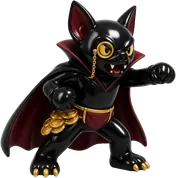 L6Count Funding
 L7Exit Liquidity
 L8Mr. Pump & Dump
 L9The Whale
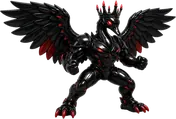 L10The Black Swan
Practice (free)
The same Solo fight with nothing at stake. Tap Try it free on the homepage, in Solo or in How to play. No wallet, no Papertrade account, no signature.
- Same fight. 1 minute on L1–L3, 3 minutes on L4–L6, 5 minutes from Level 7 to the boss, $10 at 1000×, Pepe or Bobo, BTC or ETH, health bars, heals, KOs, the same 10 villains and the boss.
- Live prices. Your fictional position opens at the live Hyperliquid mid price when the fight starts and is marked on live Hyperliquid prices.
- What's different. Instant start: no fill wait and no real execution. Nothing is sent to Papertrade. Real fights wait for Papertrade's fill and settle at Papertrade's real prices, so a real result can differ from a practice result.
- Fees. Practice shows a simulated net result with the real fee rule: 2.5% of a win (2% Papertrade + 0.5% PaperFight) after the same small close adjustment, nothing on a loss, and a KO loses the whole fictional $10. No fee is charged.
- Separate progress. Practice has its own ladder, saved in this browser only. It never counts for the jackpot, badges, your profile, Solo progress, history or streaks.
- Labelled. A "Practice · no real money" tag stays on screen the whole time, and practice cards carry a big PRACTICE stamp.
When you're ready, Fight for real · $10 takes you to the normal connect flow.
Duel (coming soon)
One rival, one clock. Each player trades on their own Papertrade account and the better real result wins. Full rules will be published at launch.
Battle Royale (coming soon)
Many fighters, one clock, last one standing. Full rules will be published at launch.
Characters and weapons
 Pepe · Up ▲ · long
 Bobo · Down ▼ · short
Fighters
- Pepe fights Up. Picking Pepe opens a long: you win when the price rises.
- Bobo fights Down. Picking Bobo opens a short: you win when the price falls.
Weapons
Your weapon is your leverage. A bigger gun hits harder in both directions: gains and losses grow, and the KO price gets closer.
| Weapon | Leverage |
|---|---|
| Water pistol | 100× |
| Blaster | 250× |
| Cannon | 500× |
| Bazooka | 1000× |
Solo always uses the Bazooka: $10 margin at 1000×. The gun's colour shows the coin: orange for BTC, purple for ETH.
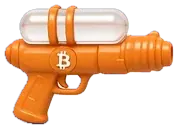 Water pistol100×
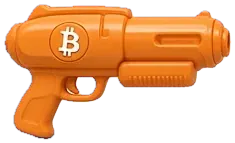 Blaster250×
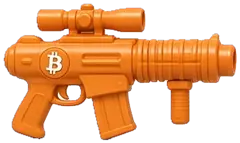 Cannon500×
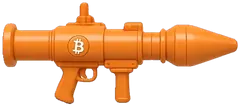 Bazooka1000×
Villains
Ten villains, from The Rugger to The Black Swan. See the Solo table above.
Wallet and 1-tap trading
Connecting
PaperFight works with browser wallets (extensions and in-app wallet browsers). Connecting shares your public address only. An optional sign-in signature proves you own the address. It is not a transaction and costs nothing.
You need a Papertrade account with at least $10 available. Deposits go to your Papertrade account: the minimum received is 10 USDC, and Papertrade charges a one-time $1 activation fee on the first deposit. Withdrawals are done on papertrade.xyz with your wallet.
The 1-tap key (session key)
To trade without a wallet pop-up on every move, you enable 1-tap trading once. PaperFight creates a session key in your browser and your wallet signs one Papertrade RegisterSessionKey message that authorizes it.
What it can do: open and close positions on your Papertrade account.
What it cannot do: withdraw, transfer or move your funds, or stake, unstake or claim on Papertrade. It is limited by Papertrade's contracts, not by a promise from PaperFight.
Validity:
- The key lasts 30 days.
- Each order it signs is valid for 1 hour. An open that does not fill within 120 seconds expires.
- The key names PaperFight's builder address as its fee address. That is how the 0.5% builder fee on winning trades is applied.
Storage: the key is encrypted in your browser with a non-extractable key (AES-GCM, IndexedDB). It never leaves your device and PaperFight's servers never see it.
Revoking:
- Forget this browser's key (in PaperFight's Papertrade panel) destroys the key in this browser. Papertrade keeps it listed until it expires, but nobody can use it without the deleted key, and it can never withdraw.
- Full revoke: call revokeSessionKey on Papertrade's SessionKeyManager contract from your wallet. This is a HyperEVM transaction that needs a little HYPE for gas. Queued orders signed by that key are cancelled. See docs.papertrade.xyz.
Fees
PaperFight's builder fee is 0.5% (set by Papertrade for every builder). You pay it only on winning trades. 10% of it feeds the jackpot, PaperFight keeps the rest. PaperFight also seeds the pot with its own USDC. Everything else is Papertrade's.
| When | Papertrade | PaperFight |
|---|---|---|
| Winning close | small-move impact adjustment, then 2% of the win | 0.5% of the win (10% of it feeds the jackpot) |
| Losing close | none on top of the loss | none |
| Liquidation (KO'd) | full $10 margin lost | none |
| First deposit | $1 one-time activation | none |
Example: a winning trade worth +$4.00 after Papertrade's impact adjustment pays $0.08 to Papertrade (2%) and $0.02 to PaperFight (0.5%). You receive +$3.90.
- The 0.5% is paid by you, on top of Papertrade's 2%, and only when you win.
- On a losing close, Papertrade pays the 0.5% builder fee out of the liquidity pool's gain, not from you. It slightly reduces the PAPER points you earn for that loss.
- Where it goes: 10% of every PaperFight builder fee feeds the jackpot. PaperFight keeps the other 90%. The result screen shows both: "PaperFight fee" and "Jackpot share".
- Keys made outside PaperFight (for example on Papertrade directly, or before the builder fee went live) carry no PaperFight fee. If your active key is one of them, PaperFight shows an "Activate PaperFight 1-tap" card on Home, Solo, Profile and before a real fight. One tap and one wallet signature (no gas) replace it with a PaperFight key. You can dismiss the card with "Not now" for 7 days. It never appears in Practice or while a fight or position is open.
- Small winning moves are reduced by Papertrade's impact adjustment. That is why a small win on PaperFight can be smaller than the raw price move suggests.
- Papertrade's fees are set by Papertrade and can change. See docs.papertrade.xyz.
Jackpot
The first player to beat the Solo boss (Level 10, The Black Swan) takes the whole jackpot: PaperFight's seed plus 10% of its builder fees. Then the pot restarts.
What the pot is
- Real money only, in two parts: the jackpot share of the builder fees PaperFight earns on Papertrade during the current round, plus the seed. Nothing is simulated.
- PaperFight's builder fee is 0.5% (set by Papertrade). 10% of it feeds the jackpot, PaperFight keeps the rest. On a win you pay the fee. On a loss Papertrade pays it out of the liquidity pool's gain, so your loss doesn't change. Liquidations add nothing.
- The 90/10 split started on 26 October 2026. Fees earned before it stay 100% in the pot, so the pot didn't drop. The exact start time, the share and the fees already in the pot are public in paperfight.xyz/jackpot.json ("split"). The share can change. A change only applies to fees earned after it.
- The math: pot = fees from before the split + 10% × (PaperFight's builder fees now − its builder fees at the split) + seed. After a win, the new round counts 10% of the fees earned after the winning close, plus the seed.
- Builder fees are read live from Papertrade's Exchange contract on HyperEVM (unclaimed fees) plus Papertrade's builder stats (fees already claimed). It can be $0.00.
- Seed. PaperFight puts its own USDC into the pot. The seed sits on a public jackpot address, 0x2c01080773E224ED5Fc3F5C41E87F67b6b151eD3, and the site reads its balance live from Hyperliquid (spot USDC, perps account value and HyperEVM USDC) and shows it as "Seeded by PaperFight". It counts only while the money is there. If the balance can't be read, the site leaves the seed out rather than guess. The winner gets the fees and the seed.
- PaperFight's builder address is public, so anyone can check it on-chain: 0x6fdd4c1582817e20783f7db673ab03b9a35e689f. The round state is public too: paperfight.xyz/jackpot.json
Who wins
- Only Solo fights made on paperfight.xyz count: $10 at 1000× on your own Papertrade account.
- The fight must be routed through PaperFight: placed with a 1-tap key that names PaperFight's builder address. Keys made outside PaperFight don't count. Tap "Activate PaperFight 1-tap" when PaperFight asks. It counts from your next real fight, not past ones.
- You must clear L1 to L9 and then beat the boss, every one of those fights routed through PaperFight. The winning boss fight must close with at least +$12 after fees, within its 5-minute clock, as recorded by Papertrade. A liquidation is never a win.
- Only boss fights closed after the rules went live count (26 October 2026, 05:15 UTC).
- First means the earliest qualifying boss close in Papertrade's records, by close time. If two close at the same time, the lower position ID wins.
- You must be 18 or older and allowed to use Papertrade.
Verification
- When you beat the boss, the result screen says "Jackpot: pending verification". Your browser sends your wallet address and that fight's position ID to PaperFight. The server reads Papertrade's public record of the fight and logs the claim.
- Before any payout, PaperFight checks Papertrade's public records and HyperEVM by hand. The position must be yours, $10 at 1000×, closed in time with at least +$12, and routed through PaperFight's builder code. Your L1 to L9 run must also show in your Papertrade history, with PaperFight's builder fee recorded on each cleared fight (a fight placed outside PaperFight doesn't count toward the path, but doesn't reset it either), each fight within its level's clock (plus 30 seconds for the fill and the close). Fights opened before 26 October 2026, 11:30 UTC are checked against the clocks in force then (1 minute on L1–L6).
- A win that fails a check doesn't count. The next qualifying win is checked instead.
- Once a winner is found, the site shows "Jackpot won by 0xabc…123, payout pending verification". After payment it shows "paid" with the transaction.
Payout
- Manual. PaperFight approves every fee claim and every payout by hand. Nothing is paid automatically.
- Paid in USDC, not PAPER. PAPER can't currently be transferred between wallets, and PaperFight's fees are paid in USDC.
- How it's paid: PaperFight claims its builder fees on Papertrade, which takes a HyperEVM transaction (chain 999). It then withdraws the USDC to its own Hyperliquid account and sends the jackpot share to your wallet address on Hyperliquid (HyperCore). The seed is sent from the jackpot address 0x2c01080773E224ED5Fc3F5C41E87F67b6b151eD3 on Hyperliquid. From there you can deposit it to Papertrade or withdraw it.
- Amount: the whole pot at the moment the winning fight closed: the round's jackpot share of the fees plus the seed balance then. PaperFight pays the HYPE gas itself.
- Limits outside PaperFight's control: Papertrade's minimum withdrawal is 10 USDC, so a smaller pot waits until PaperFight can move it (the amount owed stays the same). If Papertrade's payout queue is active, part of the claim can wait in that queue.
- If your Hyperliquid account has never been used, Hyperliquid takes a one-time 1 USDC activation fee from the transfer. That's the only deduction that can apply.
- Timing: after verification and the fee claim. There's no fixed deadline. The transaction is posted on the site once it's sent.
After a win
The pot restarts and a new round begins with the next fight. The jackpot share of fees earned after the winning close belongs to the new round. While a payout is pending, the seed in the jackpot address belongs to that winner and isn't shown in the new pot. Any new seed PaperFight adds after that counts for the next winner.
Changes
PaperFight may change, pause or end these rules later. Changes are posted on this page and on PaperFight official channels. Nothing beyond this page is promised.
Points
Stack points. Keep them. What they'll be worth? Nobody knows yet.
Points (Season 0) count your real, verified Solo fights. They have no monetary value and may change or never be used. Nothing is promised for them: no token, airdrop, NFT or reward.
How you earn
- +10 for every real fight: your first 30 fights per wallet per UTC day (more fights that day earn no fight points).
- +50 × level for every level you clear: L1 +50, L2 +100 … L9 +450, L10 +500.
- +100 checkpoint bonus for clearing L3 or L6.
- +1,000 boss bonus for beating The Black Swan (L10).
- +1 per $0.01 of fees you really pay on the close (Papertrade's fee, PaperFight's builder fee included).
- A KO or a missed target earns the +10 fight points only. Practice earns nothing.
What counts
- Real Solo fights only: $10 at 1000× on your own Papertrade account, opened and closed with a 1-tap key that names PaperFight's builder address (0x6fdd4c1582817e20783f7db673ab03b9a35e689f).
- A close counts when Papertrade records PaperFight's builder fee on it. A KO counts when its opening order was signed by your PaperFight 1-tap key, checked on HyperEVM. Same rules as the live feed.
- Levels are replayed from your fight history with the Solo rules (targets, clocks, checkpoints after L3 and L6), so a win only counts if it really hit the target within the clock.
- Fights count from 26 October 2026, 05:15 UTC (13:15 UTC+8), when the current Solo rules went live.
- Points are computed from public Papertrade and HyperEVM data. Points store nothing about you, and there's no sign-up. They refresh about once a minute. The number shown right after a fight is an estimate until the sync.
Public names
The boards and the live feed show your public name, or your short wallet (like 0xabc1…2345) if you don't have one. Your full address is never shown next to your name.
- Tap your name on your profile and type one. With 1-tap on, that's it: your 1-tap key confirms it in the background, so no popup.
- Without 1-tap on this device, hit Go public and your wallet signs one free message instead. No transaction, no gas.
- 3–16 characters: letters, numbers, spaces, _ and -. One wallet, one name, and each name is unique (case, spaces, _ and - don't count).
- Only wallets that have played a real PaperFight fight can go public. One change every 10 minutes.
- Names that impersonate PaperFight, Papertrade, Hyperliquid, staff or other players, or that are offensive, are refused or removed.
- Make private on your profile removes it. Boards update within about 2 minutes.
Fine print
Points aren't money, a token or a claim on anything. They can't be bought, sold, transferred or redeemed. We may change the scoring, recount, reset or stop points at any time. Points earned by abuse (wash trading, automation, several wallets gaming the rules) may be removed. See the [terms](/terms).
Risks
- Real money. Every real fight is a real leveraged position. Only Practice is simulated, and it has no prize.
- 1000× leverage. A move of about 0.05% against you liquidates the position and loses the whole $10 margin. That can happen in seconds.
- Games feel easy. Health bars, villains and timers make trading feel like play. The losses are real.
- Papertrade risk. Execution, prices, liquidations, settlement and custody depend on Papertrade, Hyperliquid prices and HyperEVM. Delays, outages or bugs there affect your trade.
- Not advice. Nothing on PaperFight is financial advice.
Only use money you can afford to lose. You must be 18 or older. Read the full risk notice at paperfight.xyz/risk.
Security and custody
- PaperFight never holds, receives or redirects funds. Deposits and withdrawals happen on Papertrade.
- The 1-tap key cannot withdraw. It is created and encrypted in your browser and never sent to PaperFight.
- Every wallet signature is shown in your wallet before you sign. Sign-in is a free message, not a transaction.
- The site runs with a strict Content Security Policy, no inline scripts and no third-party scripts except Cloudflare's privacy-friendly analytics beacon. It cannot be framed by other sites.
- Requests to Papertrade go through a locked-down proxy that only forwards Papertrade's own API routes.
- Report a security issue through PaperFight official channels.
FAQ
Is this a demo or paper money?
Real fights are not. Papertrade uses real USDC. Every real fight is a real position and can lose the whole $10 stake. Practice is the only simulated mode, and it is clearly labelled.
Is there a free mode?
Yes: Practice. It's the same Solo fight on live Hyperliquid prices with a fictional $10. It needs no wallet and moves no money. It starts instantly at the live mid price, with no fill wait and no real execution. Practice has no prize, never counts for the jackpot, and keeps its own progress in this browser.
Does PaperFight hold my money?
No. Your funds stay on your own Papertrade account. PaperFight cannot withdraw or move them.
What do I need to play?
You need to be 18 or older, a browser wallet, a Papertrade account with at least $10 available, and 1-tap trading enabled (one signature).
Why didn't the clock start when I pressed Fight?
The fight starts when Papertrade fills your order. While the open waits in Papertrade's queue you can cancel it. If it does not fill within 120 seconds it expires at no cost.
Why is my result different from the live number?
The live number is an estimate from the current price. The final result is the realized P&L Papertrade reports after the close executes, including its impact adjustment and fees.
Why is my small win smaller than the price move?
Papertrade trims small winning moves (a dead zone, then a holdback that fades as the move grows) and takes 2% of wins, plus PaperFight's 0.5%. Losses are not trimmed. See "Why small wins pay less" above.
What is in a shared link?
Links from a shared card look like paperfight.xyz/?r=share&src=card&lv=3&ch=x: the card type, the Solo level and the channel (X, share sheet or copied link). No wallet address, no name. PaperFight uses the tag to count visits, connects and first fights that came from shares, then removes it from the address bar.
What happens if I lose connection mid-fight?
The position stays open on Papertrade. Reopen PaperFight to resume, close it or leave it open, or close it on papertrade.xyz.
What is PAPER?
PAPER is Papertrade's points token. Papertrade mints PAPER to you when you lose a trade. It lives on Papertrade, not on PaperFight.
How do I withdraw?
On papertrade.xyz, with your wallet. PaperFight has no withdraw function.
How do I turn off 1-tap trading?
Use Forget this browser's key in PaperFight's Papertrade panel, or revoke the key on Papertrade's contract from your wallet for a full on-chain revoke.
How does the jackpot work?
The first player to beat the Solo boss with a fight routed through PaperFight takes the whole pot. That's the USDC PaperFight seeds it with from its own public address (0x2c01080773E224ED5Fc3F5C41E87F67b6b151eD3) plus 10% of PaperFight's real builder fees for the round. PaperFight keeps the other 90% of its fees. Both parts are read live. The win is checked against Papertrade's records first. PaperFight then pays it by hand in USDC to your wallet on Hyperliquid, and the pot restarts. Full rules: see Jackpot above.
When do Duel and Battle Royale launch?
They are coming soon. Solo is the only live mode today.
Is my progress saved?
Your Solo level and stats are saved in this browser. Your trades themselves are on Papertrade. The win streak on the result screen counts real Solo wins in a row on this browser, from 26 October 2026 on.
How do I contact PaperFight?
Through PaperFight official channels.
Legal
- Terms: paperfight.xyz/terms
- Privacy: paperfight.xyz/privacy
- Risk notice: paperfight.xyz/risk